Turn AI conversations into sales pipeline.
See which companies 12 AI assistants, including ChatGPT, Gemini, Claude and Google AI Overviews, send to your site, what they were likely looking for, and how close they are to buying. Warm accounts go to your CRM with notes. A weekly to-do list shows what to change so AI recommends you more.
- From AI
- 41
- Buying intent
- 18
- In a deal
- 7
- Hot
Acme Logistics
Likely asked ChatGPT: “Which tool shows the companies AI sends us?”
- Warm
Brightline Media
Likely asked Perplexity: “GDPR-safe visitor identification for the EU”
- Curious
Kestrel Analytics
Likely asked Gemini: “AI visibility tools with CRM sync”
A B2B software company arrived from a ChatGPT answer about [category]. Three visits in eight days, pricing then demo. Synced to HubSpot on day 3. Closed in five weeks.
Day 1
Arrives from a ChatGPT answer
Day 3
Synced to HubSpot
Within 8 days
3 visits: pricing, then demo
Week 5
Closed
Used by teams from







What changed
Your buyers now ask AI which tools to look at.
What buyers do
They ask ChatGPT, Gemini or Claude for a shortlist.
They get one in seconds. Then they visit only the names on it.
“Which tools should we look at for …?”
1. Vendor A · 2. Vendor B · 3. Vendor C
What you see
Those visits show up in your analytics as "Direct".
You can't tell which came from AI, which company it was, or what they were likely looking for.
- Source
- Direct
- Company
- —
- Question asked
- —
Targetlytics shows you that missing part: who AI sent, what they were most likely looking for, and what to change so AI recommends you more often.
1 · Turn AI visits into pipeline
See which companies AI sends you, and send them to your CRM.
When AI sends someone to your site, you see their company, the question they most likely asked, and the pages they read. Their buying intent rises as they come back and look at pricing, demo or contact pages. Warm accounts go to your CRM with notes, so sales can follow up the same day.
- Company names worldwide: around 40–50% of consented visits resolve to a company.
- Individual people in the US only, with consent.
- HubSpot live; Pipedrive, Attio and Zoho coming.
Who AI sent you
Acme Logistics
Finland · acmelogistics.com
Buying intent, visit by visit
Their journey
- Sep 28Curious 25
First visit: someone at Acme Logistics, from ChatGPT
Likely asked ChatGPT about: Which tool shows the companies AI sends us?
Guides · 2 min
- Oct 2Warm 52
Came back and read pricing
Pricing, Integrations · 6 min
Sent to HubSpot with notes
- Oct 6Hot 81
A colleague opened the demo page
Demo, Pricing · 4 min
Step 1
A buyer asks AI for a shortlist, and you're on it (or a competitor is).
Step 2
They click through to your site.
Step 3
You see the company, the question they most likely asked, and the pages they read.
Step 4
Their buying intent rises as they return and visit pricing, demo or contact pages.
Step 5
Warm accounts land in your CRM with notes. In the EU, with the roles worth contacting.
Step 6
You see the leads, deals and revenue AI brought in, and what you lose when it recommends someone else.
2 · See where you stand
How often do AI assistants recommend you?
We ask AI assistants the questions your buyers ask, every day, many times each. You see how often you're recommended, who gets recommended instead, and which assistant recommends you most.
- ChatGPT
- Google AI Mode
- Google AI Overviews
- Gemini
- Claude
- Perplexity
- Copilot
- Grok
- DeepSeek
- Llama
- Mistral
- GLM
AI recommended you in 240 of 1,488 answers. Two competitors were recommended more.
Claude
- Recommended in 36 of 124 answers
Perplexity
- Recommended in 30 of 124 answers
Llama
- Recommended in 27 of 124 answers
DeepSeek
- Recommended in 25 of 124 answers
ChatGPT
- Recommended in 22 of 124 answers
 Gemini
- Recommended in 21 of 124 answers
GLM
- Recommended in 20 of 124 answers
Google AI Mode
- Recommended in 18 of 124 answers
Grok
- Recommended in 14 of 124 answers
- Recommended in 12 of 124 answers
Bing Copilot
- Recommended in 9 of 124 answers
Mistral
- Recommended in 6 of 124 answers
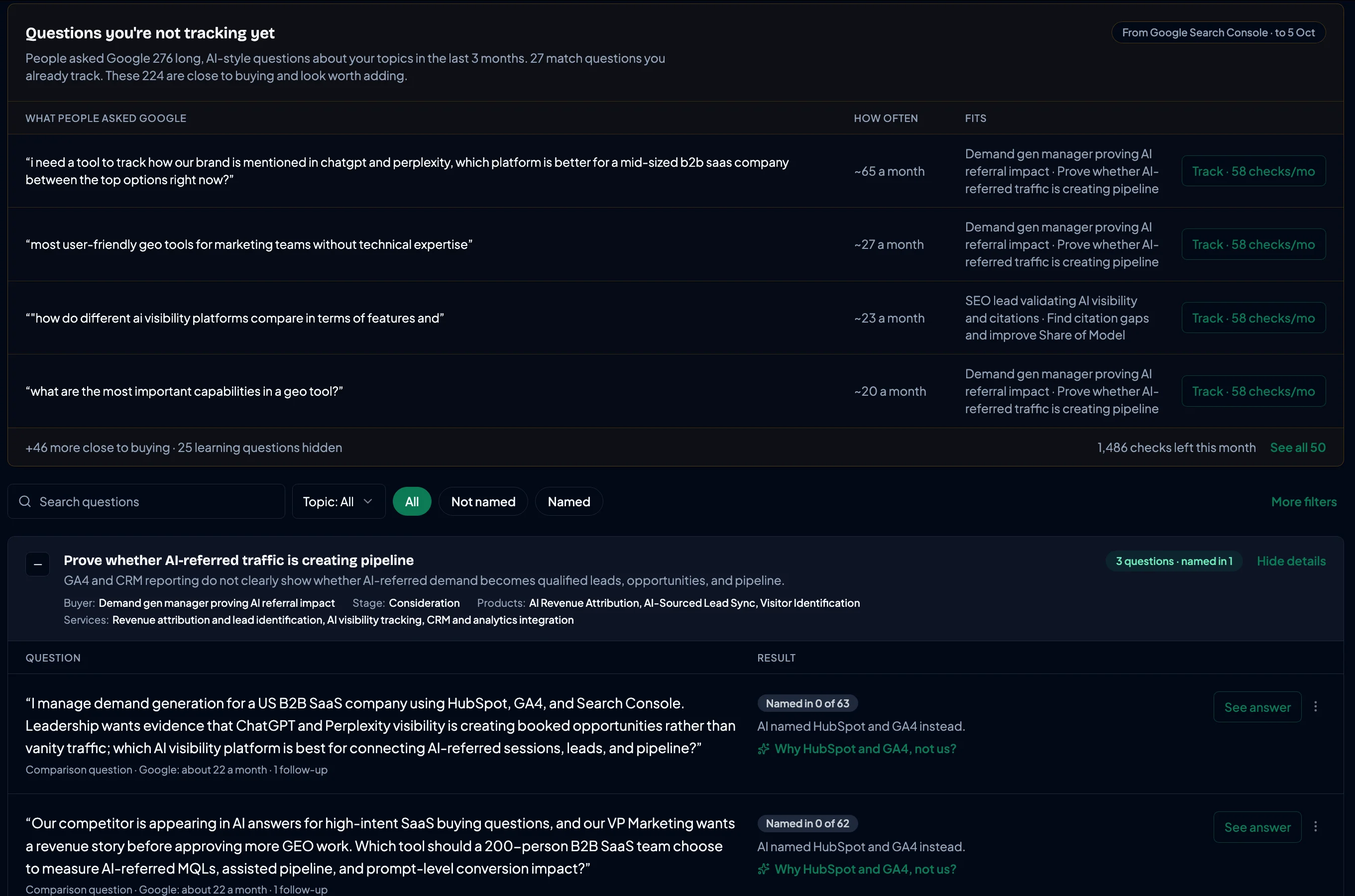
The questions behind the numbers
We ask AI what your buyers ask, the way they ask it.
Buyer persona prompts, built from your Google Search Console data and your CRM, with prompt tracking across every AI assistant.
From what people already search
Connect Google Search Console and we find the long, AI-style questions people ask Google about your topics. We suggest the ones close to buying, with how often each is asked, so your coverage grows with real demand.
Built from the deals you've already won
Connect your CRM and we look at who bought in the last 90 days: their role, their company, what they needed. The questions are refreshed every month to match.
Asked the way your buyers ask
Each question is tied to a buyer, a buying stage, a topic, the products and services it's about, and the kind of question it is (learning or comparing). It's asked as your real buyers would ask it: role, industry, journey, country and language, often with a follow-up.
A steady rate, not one lucky answer
AI gives a different answer each time. We ask every question with variations, across several buyer personas, many times, on every assistant. You see a steady rate, like "recommended in 2 of 46 answers".
Showing a question you lose is deliberate. It proves the numbers are real, and it's exactly the gap your to-do list then helps close.
3 · Know what to fix
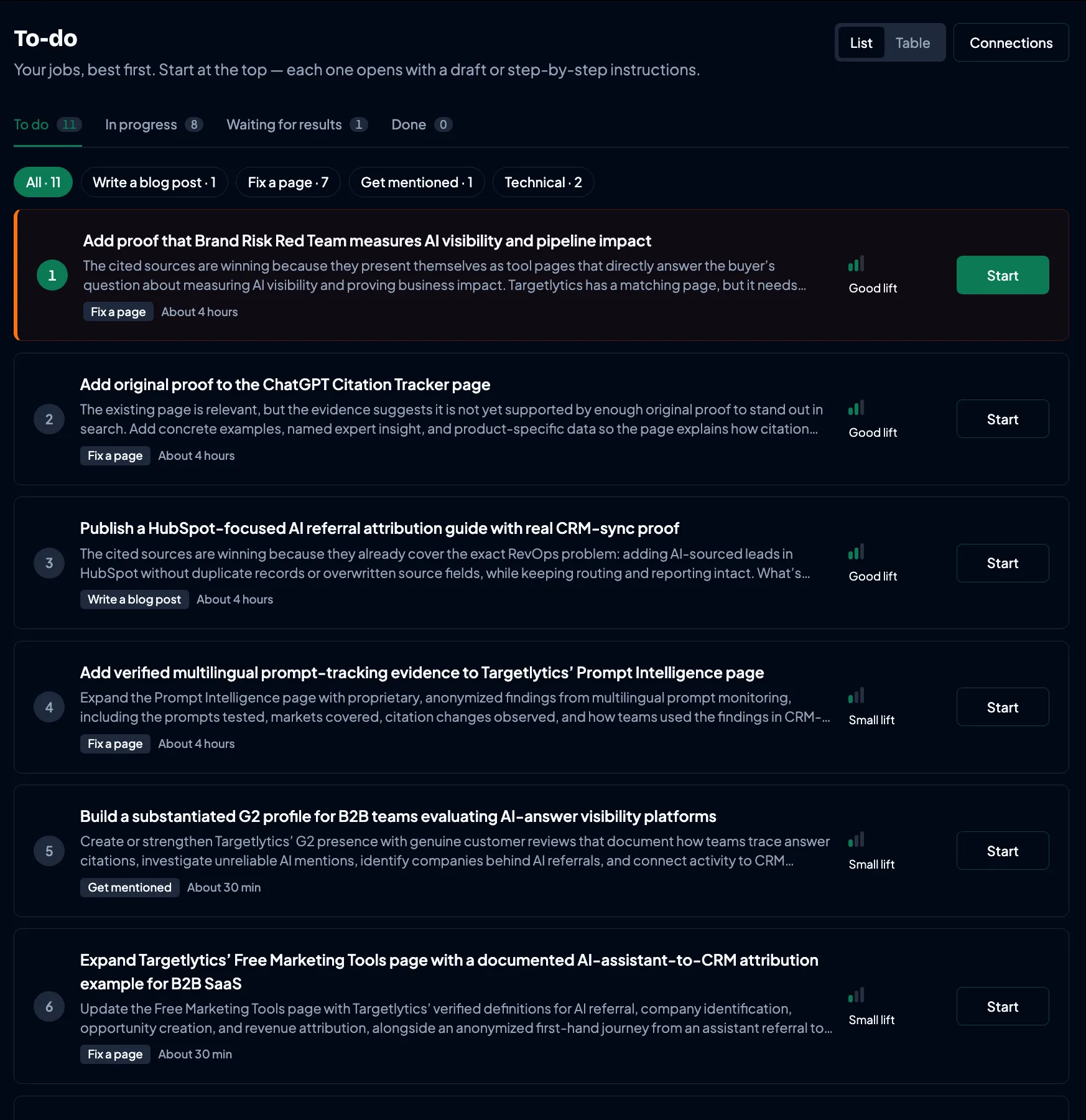
A short to-do list every week, best job first.
Each job says why it matters and how long it takes. Most come with a draft: a page fix, a new article, or a site to ask for a listing. Nothing is published or sent until you approve it.
4 · Keep what AI promised
The page they land on picks up where AI left off.
A buyer asks AI a question, gets an answer, and clicks through. We check that the page they land on keeps what the answer promised. For visitors arriving from AI, the top of the page answers the question they most likely asked, and the next step matches how close they are to buying. Then you see what each page earned.
- Visitors from search and AI crawlers see your page unchanged.
- Nothing is published until you approve it.
- Works with one line on your site; your developer sets it up once.
- AI said
- Identifies AI-sourced accounts, reports AI visibility, measures downstream conversion.
- Page keeps
- Visibility reportingConversion measurementAccount identification · partly
- AI visitor sees
“Which tool identifies the companies AI sends us?”
answered at the top of the page
- Next step
- Comparing optionsComparison table
Earned, 30 days
- AI visits
- 48
- sign-ups
- 6
- left within 10s
- 9
Each test idea comes with what we saw and what to try. Add it to your to-do and we track the page before and after.
Step 1
AI answers a buyer and sends them to a page on your site.
Step 2
We check the page against what the answer promised.
Step 3
AI visitors see that question answered at the top, and a next step that fits their stage.
Step 4
You see what the page earned, and a short list of things to test next.
5 · Protect your reputation
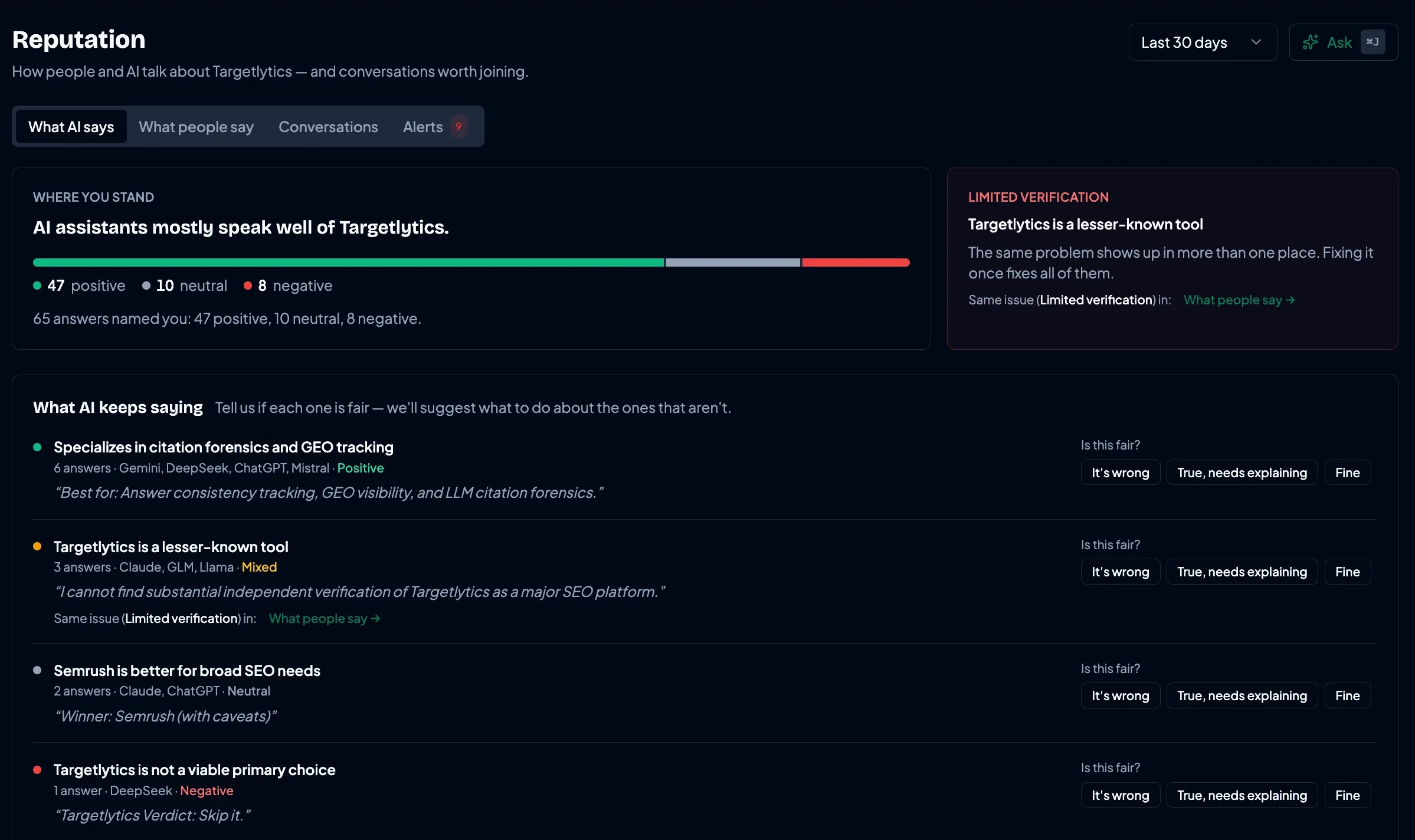
What do AI and people online say about you?
See what AI assistants and people on Reddit, LinkedIn and review sites say about you. When an assistant gets your price or features wrong, you're told, and shown which source it took it from.
Works with your tools
Live today: HubSpot, Google Analytics 4, Search Console, WordPress, Shopify, Slack and more. Marked items are coming soon.














Start free with one brand.
Upgrade when you want the full to-do list and to see which companies AI sends you. Cancel any time from the app.
ProfessionalMost Popular
$229/month
For marketing teams: 3 brands, reputation alerts, content plan
Choose ProfessionalPrices shown in USD. Same plan, same price in every currency.
See what each plan includesFrequently Asked Questions
A few questions before you start
Short answers for teams deciding whether this belongs in their workflow.
Not sure yet? Start with the free audit and see your results first.Guides & resources
- GuideWhat is Generative Engine Optimization (GEO)?How AI engines choose which brands to mention, and how to measure it.Read
- GuideHow to track AI referral trafficIdentify, tag and attribute ChatGPT, Perplexity and Gemini traffic in GA4.Read
- GuideChatGPT traffic showing as Direct in GA4?Why it happens, and the step-by-step fix.Read
- Free toolFree UTM builder for AI trafficTag links for every AI assistant at once, and get the GA4 channel rules.Read
- GuideGDPR-compliant visitor identificationCompany-level identification an EU DPO will approve.Read
- GuideSee which companies visit your site from AICompany-level vs person-level, and what works in the EU.Read
Free AI visibility audit
Find out what ChatGPT tells your buyers about you.
Where you're named, what AI gets wrong, and the first three things to fix. Emailed within two hours.
- Within 2 hours
- No credit card needed
- Free